

Demystifying Hardware-Level Security: The Architecture of Custom FIDO2 Keys
- Andrew
- Architecture
- July 3, 2026
Table of Contents
As digital threats become increasingly sophisticated, traditional authentication methods are proving inadequate. Passwords, even when combined with two-factor authentication, remain vulnerable to phishing, credential stuffing, and various social engineering attacks. Hardware security keys implementing the FIDO2 (Fast Identity Online) standard represent a paradigm shift in authentication security, leveraging hardware-level protections and public-key cryptography to provide defense against even the most advanced attack vectors.
WebAuthn Protocol Architecture
The WebAuthn protocol operates on a challenge-response model where the authentication server sends a challenge to the client, which forwards it to the security key. The key signs the challenge using a private key that never leaves the secure element, and the signature is returned to the server for verification using the corresponding public key. This architecture ensures that even if the communication channel is compromised, the attacker cannot extract the private key or replay previous authentication attempts.
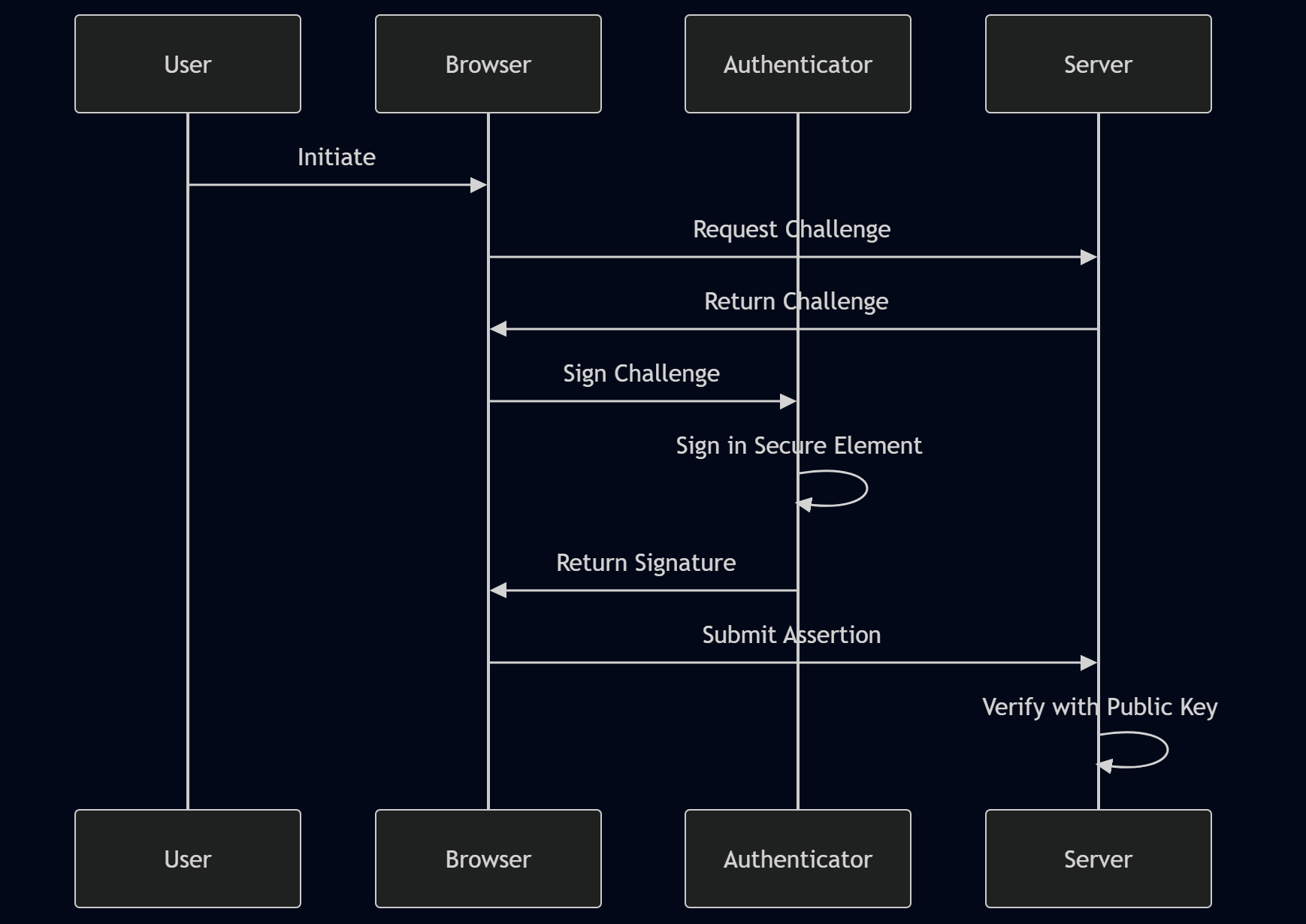
The diagram above illustrates the complete WebAuthn flow, highlighting the critical role of the authenticator’s secure element. During registration, the key generates a unique key pair for that specific service. The private key remains within the secure element, while the public key is transmitted to the server for storage. During authentication, the key signs a server-provided challenge with its private key, and the server verifies the signature using the stored public key.
Secure Element Technology
The foundation of hardware security key security lies in the secure element—a dedicated hardware component designed to resist physical and logical attacks. These elements implement tamper-resistant storage for cryptographic keys and perform cryptographic operations within an isolated environment. When a key is generated within a secure element, it cannot be extracted even with physical access to the device.
Secure elements implement multiple layers of protection:
- Tamper detection: Physical sensors detect intrusion attempts and trigger key zeroization
- Side-channel resistance: Countermeasures against power analysis, timing attacks, and electromagnetic emission analysis
- Secure boot: Verified boot chains ensure only authorized firmware executes
- Memory encryption: Keys stored in encrypted memory with hardware-bound decryption
Warning
Critical Warning: Key Loss Hardware security keys can be lost, damaged, or destroyed. Unlike passwords, there is no recovery mechanism for the private key stored in a secure element. Always register multiple keys per account and maintain secure backup keys. Losing your only security key can permanently lock you out of accounts.
Resident Keys vs Non-Resident Keys
The distinction between resident keys and non-resident keys represents a fundamental architectural decision in FIDO2 implementations with significant security and usability implications.
Non-Resident Keys (Default)
Non-resident keys are the default and most secure configuration. In this mode, the authenticator does not store the credential ID or user information. Instead, the credential ID is stored by the relying party (the service) and provided to the authenticator during authentication. The authenticator uses the credential ID to locate the corresponding private key within its secure element.
Security advantages:
- Minimal storage on authenticator: Reduces attack surface for credential extraction
- No user information stored: Privacy-preserving by design
- Credential ID required for authentication: Prevents unauthorized authentication attempts
- Scalability: Supports thousands of credentials without authenticator storage limits
Usability trade-offs:
- Requires username input: Users must provide their username before authentication
- Slower authentication: Additional round-trip to retrieve credential ID from server
Resident Keys
Resident keys store the credential ID and user information directly on the authenticator. This enables usernameless authentication—the authenticator can present available credentials to the user without prior username input.
Usability advantages:
- Usernameless authentication: Users select credentials directly from the authenticator
- Faster authentication: Eliminates username input step
- Better UX for mobile devices: Simplified authentication flow
Security considerations:
- Increased attack surface: More data stored on authenticator increases extraction risk
- Privacy concerns: User information stored on authenticator
- Storage limitations: Authenticators have limited storage for resident credentials
- Credential enumeration: Potential for enumerating stored credentials
The physical isolation of the private key (non-exportable) remains the ultimate defense regardless of key type. Even with resident keys, the private key never leaves the secure element, ensuring that credential storage on the authenticator does not compromise the fundamental security model.
Server-Side Implementation
Implementing FIDO2 authentication requires server-side handling of credential creation and assertion verification. The following Python/Flask example demonstrates the credential creation flow:
from flask import Flask, request, jsonify
from fido2.ctap2 import AttestationObject, AuthenticatorData
from fido2.server import Fido2Server
from fido2.webauthn import (
    PublicKeyCredentialRpEntity,
    PublicKeyCredentialUserEntity,
    PublicKeyCredentialParameters,
    PublicKeyCredentialDescriptor,
    AttestationConveyancePreference,
    AuthenticatorSelectionCriteria,
    AuthenticatorAttachment,
    UserVerificationRequirement,
)
from fido2.cose import ES256
import secrets

app = Flask(__name__)

# Configure FIDO2 server
rp = PublicKeyCredentialRpEntity(
    id="example.com",
    name="Example Service"
)

server = Fido2Server(rp)

@app.route('/register/start', methods=['POST'])
def register_start():
    """Initiate credential registration"""
    user = PublicKeyCredentialUserEntity(
        id=secrets.token_bytes(16),
        name="user@example.com",
        display_name="Example User"
    )

    # Create registration options
    options, state = server.register_begin(
        user,
        user_verification=UserVerificationRequirement.PREFERRED,
        authenticator_attachment=AuthenticatorAttachment.CROSS_PLATFORM,
        attestation=AttestationConveyancePreference.DIRECT,
        credential_parameters=[PublicKeyCredentialParameters(type="public-key", alg=ES256.ALGORITHM)]
    )

    # Store state for verification (in production, use proper session management)
    session_id = secrets.token_hex(16)
    # session_store[session_id] = state

    return jsonify({
        'session_id': session_id,
        'options': options
    })

@app.route('/register/finish', methods=['POST'])
def register_finish():
    """Complete credential registration"""
    data = request.json
    session_id = data['session_id']
    credential = data['credential']

    # Retrieve state from session
    # state = session_store.get(session_id)
    # if not state:
    #     return jsonify({'error': 'Invalid session'}), 400

    # Verify attestation
    # auth_data = server.register_complete(state, credential)

    # Store credential ID and public key for future authentication
    # credential_id = auth_data.credential_id
    # public_key = auth_data.public_key

    return jsonify({'status': 'success'})

@app.route('/authenticate/start', methods=['POST'])
def authenticate_start():
    """Initiate authentication"""
    # Retrieve stored credential IDs for user
    # allow_credentials = [PublicKeyCredentialDescriptor(type="public-key", id=cred_id)]

    options, state = server.authenticate_begin(
        # allow_credentials=allow_credentials,
        user_verification=UserVerificationRequirement.PREFERRED
    )

    session_id = secrets.token_hex(16)
    # session_store[session_id] = state

    return jsonify({
        'session_id': session_id,
        'options': options
    })

@app.route('/authenticate/finish', methods=['POST'])
def authenticate_finish():
    """Complete authentication"""
    data = request.json
    session_id = data['session_id']
    credential = data['credential']

    # Retrieve state from session
    # state = session_store.get(session_id)

    # Verify assertion
    # auth_data = server.authenticate_complete(state, credential)

    return jsonify({'status': 'success'})

if __name__ == '__main__':
    app.run(debug=True)
This implementation demonstrates the core FIDO2 flow, but production deployments require additional considerations:
- Session management: Secure storage of registration/authentication state
- Credential storage: Database schema for storing credential IDs and public keys
- Error handling: Comprehensive error handling for various failure scenarios
- Rate limiting: Protection against brute force attacks
- Logging: Security event logging for audit trails
Attestation Metadata
Authenticator attestation provides verifiable information about the authenticator’s characteristics and manufacturer. The following table details the key metadata elements included in attestation certificates:
| Metadata Field | Description | Security Implications |
|---|---|---|
| AAGUID | Authenticator Attestation Globally Unique Identifier - 128-bit identifier for authenticator model | Identifies authenticator type for policy decisions (specification) |
| Counter | Signature counter value that increments with each use | Detects cloning attacks if counter decreases |
| Extension Data | Optional extensions for additional functionality | May include transaction authorization, enterprise features |
| Certification | FIDO Alliance certification level (L1-L3) | Indicates tested security assurance level |
| Form Factor | Physical form factor (USB, NFC, BLE) | Determines attack surface and use cases |
| User Verification | Required verification methods (PIN, biometric) | Affects security vs usability trade-offs |
Info
AAGUID Significance The AAGUID serves as a globally unique identifier for authenticator models. Services can implement allow-lists or block-lists based on AAGUIDs to enforce specific security requirements. Enterprise deployments often restrict authentication to certified authenticators with specific AAGUIDs meeting organizational security policies.
Origin Binding and Phishing Resistance
One of the most significant advantages of FIDO2 keys is their inherent resistance to phishing attacks. The key incorporates the origin (domain) of the authentication request into the signed challenge, creating a cryptographic binding between the authentication and the requesting service.
This property, known as origin binding, works through the following mechanism:
- Challenge generation: Server generates random challenge
- Origin inclusion: Browser includes the requesting domain in the client data
- Signature creation: Authenticator signs both challenge and origin
- Verification: Server verifies signature and checks origin matches expected domain
Even if a user is tricked into visiting a malicious site, the security key will refuse to authenticate for that domain because the origin in the signature won’t match the legitimate service’s expected origin. This makes FIDO2 effectively immune to credential phishing and man-in-the-middle attacks.
Warning
Implementation Warning Origin binding only works correctly if the relying party properly validates the origin during verification. Improper implementation that skips origin validation undermines this critical security feature. Always verify that the origin in the assertion matches your service’s expected domain.
Custom and DIY Security Keys
While commercial FIDO2 keys from vendors like Yubico and Feitian are widely available, there’s growing interest in custom and DIY security key implementations. Projects like SoloKeys and Nitrokey offer open-source hardware designs that allow for greater transparency and customization.
For security researchers and advanced users, custom implementations provide opportunities to:
- Understand architecture: Study the underlying hardware and firmware design
- Implement additional features: Add custom functionality beyond standard FIDO2
- Integrate with existing hardware: Embed authentication capabilities in other devices
- Audit implementations: Verify security properties through code review
However, building a secure element from scratch is extremely challenging. Most custom implementations rely on certified secure elements from established manufacturers rather than attempting to implement tamper-resistant hardware independently. The security of a FIDO2 key ultimately depends on the secure element’s ability to resist physical extraction and side-channel attacks—capabilities that require specialized hardware design and manufacturing processes.
Implementation Considerations
Deploying FIDO2 authentication requires careful consideration of several practical factors beyond the technical implementation:
Backup and Recovery Strategies
Unlike passwords, hardware keys can be lost or damaged, potentially locking users out of their accounts. Best practices include:
- Multiple keys per account: Register at least two security keys per account
- Secure backup keys: Store backup keys in secure, off-site locations
- Recovery codes: Provide one-time recovery codes as emergency fallback
- Grace period: Implement temporary recovery mechanisms for key loss scenarios
User Education
The authentication workflow differs significantly from traditional password-based approaches. Organizations implementing FIDO2 must invest in user education covering:
- Key usage: How to properly use the security key (USB insertion, NFC tapping, BLE pairing)
- Key care: Proper storage and maintenance of security keys
- Recovery procedures: What to do if a key is lost or damaged
- Security benefits: Understanding why the additional hardware is necessary
Device Compatibility
Not all devices support FIDO2 authentication out of the box. Consider compatibility requirements:
- USB-A vs USB-C: Physical connector compatibility
- NFC support: Required for mobile device authentication
- Browser support: WebAuthn API support in target browsers
- Operating system: Native OS support for FIDO2 protocols
Future Directions
The FIDO2 standard continues to evolve, with ongoing work on features that enhance security and usability:
Passkeys
Passkeys represent the next evolution of FIDO2, synchronizing credentials across devices while maintaining hardware-level security. This approach eliminates the need for physical keys while preserving the security benefits of public-key cryptography. Passkeys sync through cloud services encrypted with the user’s device unlock method (PIN, biometric), providing convenience without compromising security.
Biometric Integration
Integration with device biometrics (fingerprint readers, facial recognition) enhances usability while maintaining security. Biometric data never leaves the device, and the biometric verification simply authorizes the secure element to perform the cryptographic operation.
Enterprise Features
Enterprise-focused features include:
- Attestation policies: Enforce specific authenticator types based on AAGUID
- User verification requirements: Require PIN or biometric for high-value transactions
- Transaction authorization: Cryptographically bind authentication to specific transaction data
- Compliance reporting: Generate audit trails for regulatory compliance
Conclusion
Hardware security keys implementing the FIDO2 standard represent the current gold standard in authentication security. By combining secure element technology, public-key cryptography, and protocol-level protections against phishing, they provide defense against attack vectors that plague traditional authentication methods.
The architectural principles—non-exportable private keys, origin binding, and hardware-based attestation—create a security model that fundamentally changes the authentication landscape. As digital threats continue to evolve, hardware-backed authentication will become increasingly essential for protecting sensitive systems and data.
Understanding the architecture and implementation details of these devices is crucial for security professionals and developers building secure authentication systems. The investment in FIDO2 implementation pays dividends through dramatically reduced credential theft, phishing resistance, and overall security posture improvement.
Tags :
Share :
Related Posts

Stripping the Bloat: A Deep Dive into Optimizing a Dell XPS Laptop
The Dell XPS series represents some of the finest Windows hardware available, but the out-of-box experience often comes with significant compromises. The hardware capability of these machines is impressive—high-performance CPUs, premium displays, and solid-state storage that should deliver exceptional responsiveness. Yet modern software decay caused by Windows 11 background thread overhead, hardware-assisted telemetry, and thermal throttling out-of-the-box transforms what should be a premium computing experience into a frustrating exercise in resource management.
Read More